
Inwa777 Login allows registered members to access their accounts using the username and password created during registration. Inwa777 provides a straightforward login interface with a Forgot Password option for users who cannot remember their credentials. This account access guide explains the login procedure, common authentication problems, security precautions, and password recovery steps to help members manage their accounts more effectively.
How to Complete Inwa777 Login on the Website
The Inwa777 Login process uses a simple authentication form containing Username and Password fields, followed by a Login button. Inwa777 also places the Forgot Password option beneath the password field, allowing members to begin recovering access without searching through other website sections.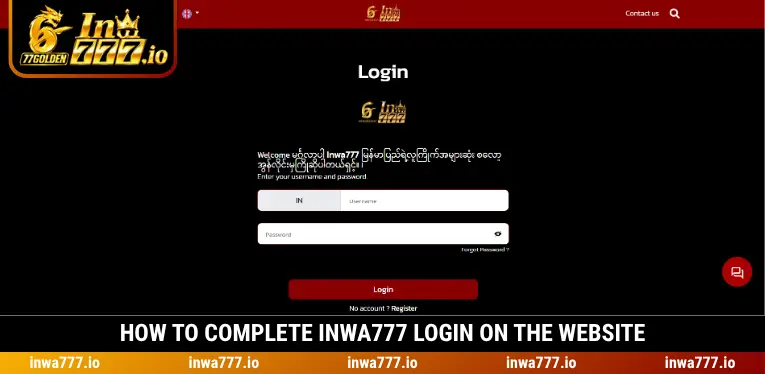
- Step 1 – Open the Login Page: Visit the Inwa777 website and select Login from the main interface. Check that the correct login form appears before entering your account information.
- Step 2 – Enter Your Username: Type the username created during registration into the designated field, checking for spelling mistakes, capitalization differences, and unnecessary spaces.
- Step 3 – Provide Your Account Password: Enter the password associated with your account, using the eye icon when necessary to reveal characters and verify your entry.
- Step 4 – Submit Your Login Request: Select the Login button after reviewing your credentials. The system will process the submitted information and determine whether account access can be granted.
- Step 5 – Check Your Account Status: If authentication succeeds, continue to the available account features. If an error message appears, review the possible causes before attempting another login.
Account Information Required for Inwa777 Login
Before completing Inwa777 Login, members need an existing account and the corresponding username and password. Inwa777 does not display a phone number field on its standard login form, as phone information is requested separately during registration and password recovery.
For users in Myanmar, understanding the distinction between usernames, phone numbers, and bank account holder names can help prevent unnecessary login errors. These details serve different purposes and should not be used interchangeably unless a particular form explicitly allows it.
| Login Element | Function and Requirement |
| Username | Enter the username created during account registration |
| Password | Provide the password associated with the registered account |
| Eye Icon | Show or hide the entered password |
| Login Button | Submit credentials for authentication |
| Forgot Password | Open the account recovery form |
| Register | Access the registration page if you do not have an account |
Common Inwa777 Login Errors and How to Fix Them
Problems during Inwa777 Login may result from incorrect credentials, unstable internet connections, browser issues, or account restrictions. Inwa777 recommends reviewing the specific problem before making repeated attempts, helping members identify the most appropriate solution.
Incorrect Username or Password Details
If the system rejects your login credentials, first verify that the username and password match the information created during registration. Common mistakes include enabling Caps Lock, using an incorrect keyboard layout, or entering accidental spaces. When performing Inwa777 Login, members can use the password visibility icon to check their entries before submitting another request.
Website Connection and Browser Problems
A slow-loading login page or an unresponsive Login button may indicate a network or browser issue. Users should check their internet connection, refresh the page, or try a private browsing window to identify whether stored browser data is affecting access. If the problem continues, Inwa777 provides customer support channels where members can report technical difficulties.
Account Verification or Access Restrictions
When credentials appear correct but access is still denied, members should review any account status messages displayed on the screen. Additional checks may be necessary when verification requirements or unusual account activity are involved. In these circumstances, contacting Inwa777 customer support is preferable to creating multiple accounts to bypass access restrictions.
Security Tips for Protecting Your Inwa777 Login Account
Maintaining account security is essential whenever members access online betting services, particularly through shared devices or public internet connections. Inwa777 encourages users to verify website addresses, protect authentication details, and avoid storing sensitive credentials on devices outside their control.
- Verify the Website Address: Only log in through a verified website and avoid imitation pages designed to collect personal information through misleading login forms.
- Keep Passwords Confidential: Never disclose passwords or authentication codes to other individuals, including anyone claiming to represent customer support.
- Use a Unique Password: Avoid reusing passwords from email accounts or unrelated services, reducing the risk of unauthorized access following an external security breach.
- Log Out of Shared Devices: End active sessions after accessing accounts on public computers or devices that do not belong to you.
- Monitor Unusual Account Activity: If unexpected changes or unfamiliar transactions appear, stop using the affected session and contact the appropriate support channel.
Where to Get Help With Inwa777 Account Access Problems
If Inwa777 Login continues to fail after checking credentials and connectivity, members can use the Contact Us section to request assistance. Inwa777 displays four communication channels: Viber, Telegram, Facebook Messenger, and Live Chat, allowing users to choose a suitable way to report their concerns.
When submitting a request, provide your username, the approximate time of the problem, and any relevant error message. Members in Myanmar may include screenshots after concealing sensitive information. Passwords, one-time verification codes, and confidential payment details should never be shared during support conversations.
How to Recover Your Password After Inwa777 Login Issues
The Forgot Password option appears directly beneath the password field on the login page. Members who cannot remember their credentials can use this feature to begin recovering account access instead of repeatedly entering possible passwords.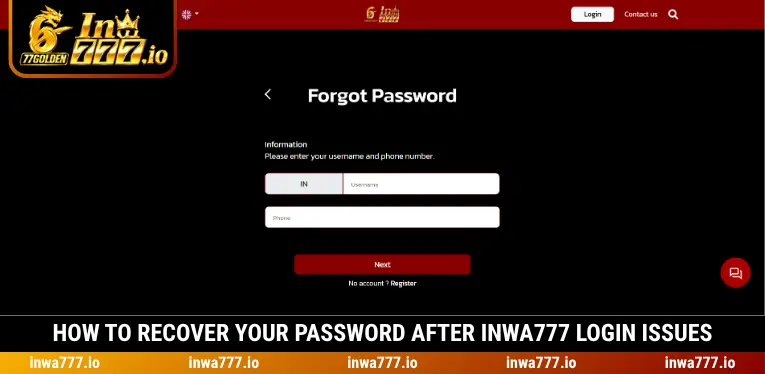
Open the Forgot Password Form on Inwa777
On the Inwa777 Login interface, select Forgot Password to open the recovery page. Inwa777 displays instructions asking for a username and phone number, followed by two input fields and a Next button. Members should provide the details associated with their existing accounts to support the recovery request.
Enter Your Username and Registered Phone Number
After opening the recovery form, type your username into the first field and enter your registered phone number into the Phone field. Verify both entries before selecting Next to proceed. For members in Myanmar, the phone number should correspond to the information originally supplied during registration and follow the format accepted by the form.
Continue the Account Password Recovery Process
After selecting Next, follow any additional verification instructions displayed by the system. The available interface confirms the username and phone number entry stage but does not show the exact procedure for creating a replacement password. If recovery cannot continue, contact Inwa777 support rather than sharing account credentials with unverified individuals.
Conclusion
Inwa777 Login provides account access through username and password authentication, with a Forgot Password feature for members who need to recover their credentials. Inwa777 offers a straightforward interface and multiple customer support channels for resolving access difficulties. To maintain secure account access, verify your login information, protect your password, and follow the account recovery instructions whenever authentication problems occur.

Soe Myintzu Lwin is the official female Brand Ambassador and Lead Content Analyst at Inwa777. As an established actress and respected media figure, she delivers trusted insights on football betting markets, live dealer casino tables, and high-RTP slots. Soe Myintzu Lwin is dedicated to promoting fair play, responsible gaming, and smooth local transactions via KPay and WavePay across Myanmar.