

Inwa777 App provides mobile access to online entertainment services through smartphones and other compatible devices. Inwa777 offers a Download APK option for Android users and instructions for adding its website to the iPhone home screen through Safari. With a mobile-friendly interface, the betting platform allows members to access gaming categories and manage their accounts more conveniently. This guide explains installation methods, app features, and solutions to common technical issues.
How to Download and Install Inwa777 App on Android and iOS
Installing Inwa777 App involves different procedures depending on the operating system. Android users can download an APK file through the website, while iPhone users can add the platform to their home screens using Safari. Inwa777 recommends verifying the installation source before proceeding to protect personal information and device security.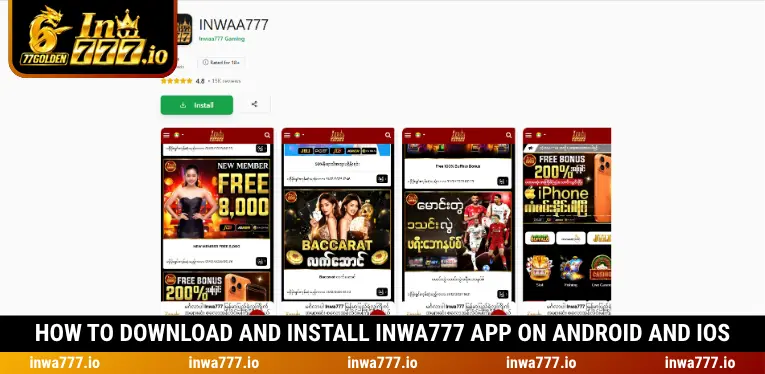
How to Download Inwa777 App APK on Android Devices
Android users can locate the Download APK option within the Inwa777 website menu. An APK file allows applications to be installed outside the default app store, provided users verify the file’s authenticity and review the relevant security warnings before installation.
- Step 1 – Visit the Website: Open a browser on your Android phone, access the verified Inwa777 website, and locate Download APK in the navigation menu.
- Step 2 – Download the Application File: Select Download APK to begin downloading, then verify the filename, distribution source, and relevant information before opening the downloaded package.
- Step 3 – Open the Installation Package: Navigate to the Downloads folder and select the APK file. If Android requests installation permission, proceed only after confirming that the file comes from a trustworthy source.
- Step 4 – Complete the Installation: Review the installation notice and requested permissions before selecting Install. Once installation finishes, disable unnecessary permission to install applications from unknown sources.
- Step 5 – Launch the Application: Find the newly installed application icon on your device, open it, and examine the interface before entering any account credentials.
How to Install Inwa777 App on iOS Using Safari
On iPhones, Inwa777 App uses Safari’s Add to Home Screen feature instead of installing an Android APK file. The application page displays three main instructions: select Share, choose Add to Home Screen, and confirm Add to create a convenient home screen shortcut.
- Step 1 – Open Safari on Your iPhone: Launch Safari and visit the verified Inwa777 application page, checking the website address before proceeding with any installation-related actions.
- Step 2 – Select the Share Button: Tap the Share icon in Safari’s toolbar to display the available options for the website currently open on your device.
- Step 3 – Choose Add to Home Screen: Scroll through the sharing options and select Add to Home Screen to prepare a shortcut for the website.
- Step 4 – Confirm the Addition: Review the displayed website name and address, then tap Add to place the shortcut on your iPhone’s home screen.
- Step 5 – Open the Home Screen Icon: Locate the newly created icon and tap it to access Inwa777 without manually entering the website address each time.
Inwa777 App Version Details and Interface Information
The Inwa777 App page shown in the provided screenshots displays the name INWAA777 and the publisher name Inwa777 Gaming. It also features an Install button, gaming screenshots, download figures, and user ratings. These details help identify the displayed application, although Inwa777 recommends checking the actual distribution source before installation.
| Application Information | Displayed Details |
| Application Name | INWAA777 |
| Displayed Publisher | Inwa777 Gaming |
| Download Count | 100K+ |
| User Rating | 4.8/5 stars |
| Number of Reviews | Approximately 15K |
| Displayed Age Rating | 18+ |
| Android Installation | APK download and installation |
| iOS Installation | Add to Home Screen through Safari |
Key Features of Inwa777 App for Mobile Gaming
Beyond convenient mobile access, Inwa777 App presents different entertainment categories through an interface designed for smartphone screens. The application screenshots show gaming sections, promotional banners, and a bottom navigation bar that allows members to identify available functions.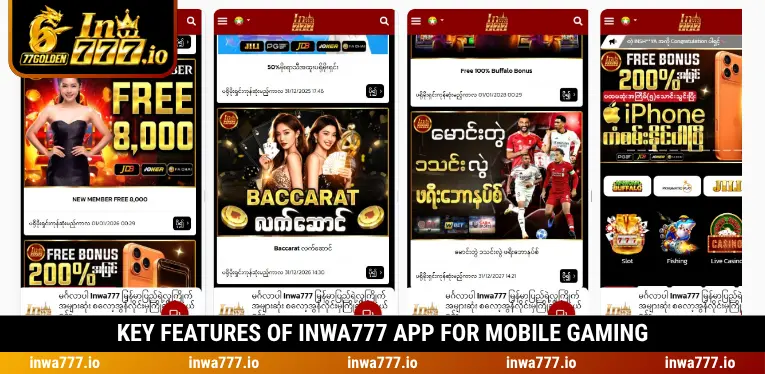
Mobile-Friendly Interface and Simple Navigation
The Inwa777 mobile interface uses prominent visual elements and navigation icons to help members locate platform features. Gaming categories and information panels are organized to support browsing on smaller screens. Actual performance and usability may vary depending on the device, screen size, operating system, and application version.
Access to Multiple Online Gaming Categories
Inwa777 App presents entertainment categories including slots, fishing games, live casino, and sports betting. Each category has different gameplay rules, participation requirements, and outcome mechanisms. Members should review the instructions for individual titles before participating, as advertised games may not be available in every application version.
Account Management and Personal Information Access
Using Inwa777 App allows members to access account-related features provided by the platform. Inwa777 displays username and password authentication on its website, alongside sections associated with member information. When using a mobile version, players should verify account compatibility and review any authentication requirements before performing financial transactions.
How to Log In and Use Inwa777 App After Installation
After installing Inwa777 App, members can open the interface and locate the Login function to access their accounts. If the application uses the same authentication system as the website, users can enter their registered username and password, then review the result of the login request.
Members without an account should check the eligibility requirements before selecting Register. Inwa777 provides a website registration form requesting a username, phone number, password, and bank account details. For users in Myanmar, installing the application does not automatically establish legal eligibility to participate in real-money betting activities.
Common Inwa777 App Download Problems and Their Solutions
During the download or installation of Inwa777 App, members may encounter problems involving internet connectivity, downloaded files, or device compatibility. Identifying the specific error message is more effective than repeatedly downloading application packages from unrelated sources.
APK Download Failures and Android Installation Errors
If an APK download fails, users should check their internet connection, available storage, and browser download settings. When Android prevents installation, review the operating system version and any security warnings. Inwa777 does not require users to bypass malware alerts, and installation should stop whenever the downloaded file cannot be verified as safe.
Unable to Add the Application Icon on iPhone
If Add to Home Screen does not appear, check whether the website is open in Safari rather than a browser embedded within another application. Open the Share menu and locate the appropriate option. For Inwa777 App, this procedure creates a home screen shortcut to the website rather than installing a native iOS application.
Application Launch Failures and Login Issues
If the application closes unexpectedly or displays a blank screen, check your internet connection and restart the device before trying again. When login credentials are rejected, review the registered username and password. Inwa777 also provides a Forgot Password function on its website, allowing members to begin account recovery using their username and registered phone number.
Essential Security Tips for Using Inwa777 App
Installing betting applications on mobile devices requires careful attention to distribution sources, application permissions, and account credentials. Inwa777 encourages members to check application authenticity before logging in, especially when using APK files distributed outside official app stores.
- Verify the Download Source: Only use installation files or application pages with a confirmed origin, avoiding APK packages shared through unidentified websites or messaging accounts.
- Review Application Permissions: Avoid granting access to contacts, messages, or sensitive information unless the application provides a legitimate explanation for requiring those permissions.
- Protect Account Credentials: Never share usernames, passwords, or authentication codes with third parties, and avoid storing confidential information on shared devices.
- Maintain Device Security: Do not disable essential security protections merely to complete installation when the operating system has identified potential risks.
- Manage Gaming Time Responsibly: Establish appropriate entertainment limits and avoid treating gambling applications as a reliable way to earn money or recover financial losses.
Conclusion
Inwa777 App allows users to access the platform on Android through an APK file or add its website to an iPhone home screen using Safari. Inwa777 provides a mobile interface featuring multiple gaming categories and account management functions. Before downloading the mobile betting application, verify its distribution source, select the appropriate installation method, and protect your login credentials for safer access.

Soe Myintzu Lwin is the official female Brand Ambassador and Lead Content Analyst at Inwa777. As an established actress and respected media figure, she delivers trusted insights on football betting markets, live dealer casino tables, and high-RTP slots. Soe Myintzu Lwin is dedicated to promoting fair play, responsible gaming, and smooth local transactions via KPay and WavePay across Myanmar.