
Inwa777 Register allows users to create an account and access the platform’s online entertainment services. Inwa777 provides a registration form requiring a username, phone number, password, and bank account details, allowing members to complete the necessary information on a single page. This account registration guide explains each step, highlights important requirements, and helps users avoid common mistakes during the signup process.
How to Complete Inwa777 Register Step-by-Step
The Inwa777 Register process uses a single registration form labeled Step 1/1, allowing members to complete all required fields without navigating through multiple pages. Inwa777 places the account information fields at the top and bank account verification details below, making it easier to review everything before submitting the registration request.
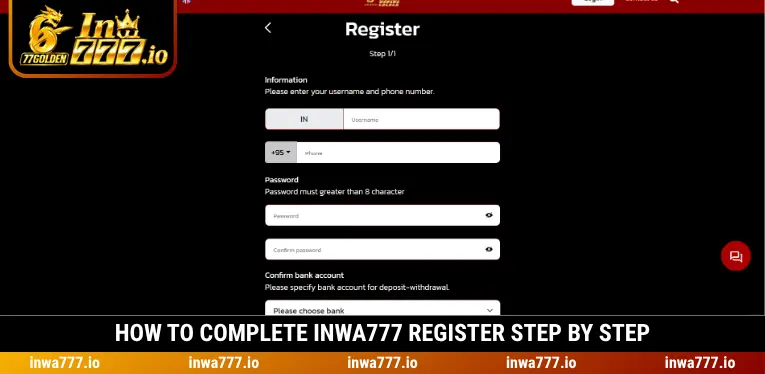
- Step 1 – Open the Registration Form: Visit the Inwa777 website and select the Register button from the navigation menu. Once the form appears, review the required fields and prepare the necessary information before proceeding.
- Step 2 – Enter Your Username and Phone Number: Create a username in the designated field, then check the +95 country code and enter your phone number in the format accepted by the system. Accurate information helps prevent difficulties during account verification.
- Step 3 – Create and Confirm Your Password: Enter a password containing more than eight characters, then type the same password into the Confirm password field. Use the eye icon to check both entries before continuing.
- Step 4 – Provide Your Bank Account Details: Under Confirm bank account, select your bank from the available list and complete the Account No and Account Name fields. Verify that the details match your bank records to reduce potential transaction errors.
- Step 5 – Submit Your Registration Request: Review your username, phone number, password, and banking information before clicking Register. Follow any additional verification instructions displayed by the system.
Account Requirements and Registration Details at Inwa777
Before starting Inwa777 Register, users should prepare an active phone number, valid bank account information, and a unique password. Inwa777 requires these details within its registration form, so having the information ready can make the signup process more convenient and reduce unnecessary corrections.
Members in Myanmar must also consider age restrictions and the legal requirements governing gambling in their place of residence. Accessing the website or successfully creating an account does not automatically establish legal eligibility to participate in real-money betting activities.
Required Information in the Registration Form
Each registration field serves a specific purpose, from identifying the account holder to establishing login credentials and payment information. Inwa777 displays the relevant field names directly in the signup interface, allowing members to review their entries before submitting the form.
| Registration Field | Information Required |
| Username | Create a username in the format accepted by the system |
| Phone | Enter a phone number using the +95 country code |
| Password | Create a password containing more than eight characters |
| Confirm Password | Re-enter the exact password |
| Please Choose Bank | Select the appropriate bank |
| Account No | Enter your bank account number |
| Account Name | Provide the registered bank account holder’s name |
Password Rules and Bank Account Verification
During Inwa777 Register, passwords must contain more than eight characters, meaning at least nine characters are required. Members should choose a unique password and avoid easily guessed information such as birthdays or phone numbers. The Password and Confirm password fields must also match to prevent confirmation errors.
Bank account information requires similar attention because it relates to the payment details associated with the account. Inwa777 displays fields for selecting a bank and entering the account number and account holder’s name during registration. Members should use banking information they are legally authorized to provide and verify its accuracy before submission.
Common Inwa777 Register Problems and How to Fix Them
Some registration attempts may fail because of incorrect information formats, password mismatches, or connectivity issues. When Inwa777 Register cannot be completed, checking individual fields is generally more useful than repeatedly submitting the entire form without identifying the cause.
Username and Phone Number Errors
A username may be rejected if it contains unsupported characters or conflicts with existing account information. Users should check for unwanted spaces, special characters, and any error messages displayed by the system. For Myanmar phone numbers, confirm the +95 country code and follow the format accepted by the registration form rather than adding or removing digits without checking the instructions.
Password and Confirmation Issues
If a password is too short or the two password fields contain different entries, the registration form may reject the submission. Inwa777 displays a requirement for passwords longer than eight characters, so members must satisfy this condition and enter identical values in both fields. The password visibility icon can help identify capitalization mistakes or incorrectly entered characters.
Bank Account and Form Submission Errors
If the bank selection menu fails to load or the Register button does not respond, users should examine their internet connection and check for incomplete fields. When Inwa777 Register continues to display errors, try refreshing the page or using another browser. If the problem remains unresolved, contact Inwa777 customer support for guidance on the registration issue.
How to Protect Your Information During Inwa777 Register
Personal information protection should begin during account creation rather than after registration is completed. Inwa777 encourages users to verify the website address and manage their login information carefully, particularly because the registration form requests bank account details.
- Verify the Website Address: Access the registration page only through a verified website and avoid imitation platforms designed to collect personal information through copied interfaces.
- Create a Unique Password: Do not reuse passwords from email accounts or unrelated services, as this can increase unauthorized access risks following an external data breach.
- Never Share Authentication Codes: Keep passwords and one-time verification codes private, even when someone claims to represent customer support or account verification services.
- Double-Check Banking Information: Compare the account holder’s name and account number with official banking records before submission to prevent avoidable payment-related mistakes.
- Protect Your Registration Device: Avoid saving login credentials on public computers, and sign out of accounts when using devices outside your personal control.
Where to Get Help With Inwa777 Registration Issues
If Inwa777 Register is interrupted or the registration form cannot be submitted, members can open the Contact Us section to find the available assistance methods. Inwa777 displays four contact options: Viber, Telegram, Facebook Messenger, and Live Chat, allowing users to select a suitable communication channel.
When requesting support, describe which field is causing the problem, when the error occurred, and what message appeared on the screen. Users in Myanmar may include relevant screenshots after concealing sensitive information. Passwords, verification codes, and other confidential credentials should never be shared during support conversations.
Conclusion
Inwa777 Register allows users to create an account by providing a username, phone number, password, and banking information. Inwa777 organizes the registration fields within a single form, making it easier to verify details before submission. If you meet the applicable eligibility requirements, follow the account signup instructions, protect your personal information, and contact customer support whenever registration errors require assistance.

Soe Myintzu Lwin is the official female Brand Ambassador and Lead Content Analyst at Inwa777. As an established actress and respected media figure, she delivers trusted insights on football betting markets, live dealer casino tables, and high-RTP slots. Soe Myintzu Lwin is dedicated to promoting fair play, responsible gaming, and smooth local transactions via KPay and WavePay across Myanmar.